I’m attending WordCamp San Francisco 2010

I’ll be in San Francisco this weekend at WordCamp SF. It’s officially a one-day conference, but I’ll be there for meetings and work sessions into the next week:
WordCamp San Francisco 2010
Saturday, May 1: WordCamp
Sunday, May 2: Developer Conference
Monday, May 3 and Tuesday, May 4: Code Sprint!

The full schedule is on the WordCamp website. Here’s what it says about the code sprint, which I imagine may be one of the highlights of the trip:

A number of WordPress core developers will be working at Pier 38, the Automattic Lounge, from 9am onward to work on patching as many bugs as possible for the 3.0 release.

I’ll have a chance to meet with many people I’ve gotten to know well over the last few months. One goal will be to meet with my Google Summer of Code mentors, Andy Skelton and Beau Lebens, and hammer out the scope of the project. Another will be to solve this nasty bug on the plane ride on Friday.

My new Macbook Pro arrived Monday (13″, 2.53 GHz, 4 GB RAM, 250 GB HD), so I’ve been getting my development environment set up and ready to go.

I’ll be probably way too active on Twitter this weekend. Oh, also, I’ll be on the genius bar at one point Saturday. If you’re going to WCSF, find me and say hello!

5 Ways to Debug WordPress

Many plugin and theme authors don’t take full advantage of some really helpful debugging tools in WordPress. Here’s a quick run-down of five cool tools for debugging:

1. WP_DEBUG

define( 'WP_DEBUG', true );

It’s no secret I love this constant and everything it stands for. Define it in wp-config.php and you’ll start seeing PHP notices and also WordPress-generated debug messages, particularly deprecated function usage.

(Added June 27, 2010: You may wish to check out my Log Deprecated Notices plugin.)

There’s also WP_DEBUG_DISPLAY and WP_DEBUG_LOG, which enable you to log these to a wp-content/debug.log file. I’ve added some inline documentation that describes these both well. Some use WP_DEBUG on a live site and just make sure it gets logged.

WP_DEBUG will often reveal potential problems in your code, such as unchecked indexes (empty() and isset() are your friend) and undefined variables. (You may even find problems in WordPress itself, in which case you should file a bug report.)

2. SCRIPT_DEBUG

In the admin, WordPress minimizes and concatenates JavaScript and CSS. But WP also comes with the “development” scripts, in the form of dev.js and dev.css. To use these instead:

define( 'SCRIPT_DEBUG', true );

3. SAVEQUERIES

The WordPress database class can be told to store query history:

define( 'SAVEQUERIES', true );

When this is defined, $wpdb->queries stores an array of queries that were executed, along with the time it takes to execute them.

The database class has additional error and debugging tools, which are documented on the Codex (though when in doubt, check the source).

4. The ‘all’ and ‘shutdown’ hooks

There’s an ‘all’ hook that fires for all actions and filters. Example usage:

add_action( 'all', create_function( '', 'var_dump( current_filter() );' ) );

You’ll be surprised how many hooks get executed on every page load. Good for troubleshooting and identifying the right hook.

There’s also a ‘shutdown’ hook you can use in combination with, say, SAVEQUERIES, and write the query information to the database. It’s the last hook to run.

5. Core Control

There are plenty of great developer-oriented plugins out there, but I’m not sure any list would be complete without Dion Hulse’s Core Control plugin. It is comprised of five modules covering Filesystem methods, HTTP methods, HTTP logging, Cron tasks, and upgrades. A must-have.


This list is by no means exhaustive, just some quick hits to get you started. What tools do you use?

WordPress serializes options and meta for you

When tracking down a potential bug last week, I noticed that many plugin authors were making the same mistake and were making their lives much more difficult in the process. The issue was related to the serialization of data (here’s the PHP manual entry). In the most basic use case, serialization is a way to store arrays and objects directly in the database, which can only store numbers, text, and dates. Serialization takes an array and turns it into a serialized string. For example:

$data = array( 'apple', 'banana', 'orange' );
echo serialize( $data );
// Result is a string we can unserialize into an array:
// a:3:{i:0;s:5:"apple";i:1;s:6:"banana";i:2;s:6:"orange";}

WordPress has a few helper functions that we use instead of serialize() and unserialize() — maybe_serialize() and maybe_unserialize(). The first only serializes data that needs to be serialized — arrays and objects — and the second only unserializes data that is already serialized. (We have a lot of handy functions like these.) At some point in 3.0, something changed, and it caused an error for plugins using get_post_meta(). Matt Martz and I tracked this down to a change in maybe_serialize():

It comes out of a change to maybe_serialize() in r13673, which for a long while serialized already serialized data, and now no longer does. We’ll probably revert this. [Which I did in r14074.]

This shouldn’t have broken plugins however, at least not in this case. But here’s what the plugin was doing:

update_post_meta( '_my_plugin_meta', serialize( array( 'foo', bar' ) ) );
unserialize( get_post_meta( '_my_plugin_meta' ) );

The unserialize and serialize bits are unnecessary. The post, comment and user meta functions, and the functions for options and transients (and site meta) all transparently serialize and unserialize data for you. Thus, this works:

update_post_meta( '_my_plugin_meta', array( 'foo', bar' ) );
get_post_meta( '_my_plugin_meta' );

I explained what was going on in #12930. Thanks to Ipstenu for raising the ticket, as we would have received a lot of complaints due to the change:

More or less, that means that you’re serializing the data, then update_option is serializing serialized data, then get_option is unserializing it once, and unserialize is unserializing it again. r13673 breaks this, as update_option doesn’t serialize the data a second time any more, causing the plugin’s unserialize() to attempt to perform a second unserialize() on data that was only serialized once.

In this case, the change was accidental, and we already went through this once nearly two years ago (see #7347r8100r8372, and others). But sometimes plugin developers that the API incorrectly or make bad assumptions makes it significantly more difficult for us to improve WordPress, as we are very mindful of plugins we may break — even if the plugin is “Doing It Wrong.” So please, don’t make it harder for us to make it easier for you.

Overhauling roles and capabilities, part 2

This is a follow-up to my initial overview of the roles and capabilities system in WordPress. I’d check out Part I first.

I’ve previously explained the complexities of the roles and capabilities system, but I haven’t adequately argued why they are too complex.

Numerous developers have weighed in at Trac ticket #10201, but I want to touch on this anyway. More or less, the current system is fine if you want to know what the current user can do. We load up their roles and merge the capabilities that make up those roles, add any other capabilities the user was granted, and remove any revoked capabilities. Then, we check if the capability we’re checking is in that list of capabilities.

The problem is apparent when you want to know the answer to this question: How many users have capability X? Querying for abstract capability X strikes some as edge case at first, so a better question might be: how many users should be considered at least an author?

To answer this question, we have to load up each user individually and build their derived capability list, by loading up their roles, add-on capabilities, and revoked capabilities. It should be fairly apparent that on a site with many users, the capabilities system can be a performance issue, to say the least.

Let’s remove user-level capabilities from the equation. Now, we can load up all of the roles, figure out which have capability X, and figure out which users have those roles. Clearly a huge performance benefit, as we’re running one query (to fetch the role definitions), unserializing its result, looping through the roles and checking for a cap, then querying the users for that role.

If only it were that easy. We store a user’s roles and capabilities in a serialized array in usermeta. That means we have to again leave SQL with every user’s usermeta value, unserialize it, and check if the user has the role. Core does employ a hack in a few spots for performance reasons, by using LIKE "%editor%" against serialized data. This very unpoetic code is the epitomy of the overly complex capabilities system.

But, we’ll no longer be storing capabilities, or multiple roles. Thus, we can now have our usermeta value be a simple text value with the name of the role. Two example queries:

SELECT * FROM $wpdb->users u INNER JOIN $wpdb->usermeta m WHERE u.id = m.user_id AND m.meta_key = 'wp_capabilities' AND m.meta_value = 'Editor';

SELECT user_id FROM $wpdb->usermeta WHERE meta_key = 'wp_capabilities' AND m.meta_value = 'Editor';

Now that is poetic code, and it would scale much better in an environment with many users. (When I mean many, I mean many, many thousands.) And I’ll point out here that there have been suggestions for a new table, to get this out of usermeta entirely.

The proposed overhaul is controversial, which explains its postponement for multiple releases, but appears to be gaining traction for 3.1. As the wp-hackers thread progressed, I suggested that the proposed overhaul could always end up being watered down a bit before entering core as a compromise, notwithstanding rather solid support from the core developers for the proposal on the table.

That said, I cannot imagine that user-specific capabilities would remain in core. If there is a compromise, it would end up being multiple roles, because we could still avoid serialized data, by using the same meta key multiple times, with different meta values. The one thing I don’t believe we would want to do is take an overly complicated system and oversimplify it, especially given the growth and scale of WordPress as a CMS. If we can sanely implement multiple roles in the new schema, keeping them may be something to consider.

The counter-argument is that we have a chance to simplify the capabilities API to make it manageable, and we should take advantage of that. We could sanely build a core plugin for role management. Multiple roles not supported in the user interface, nor would they be supported in such a plugin, leaving them to be the only piece of the API that would not be exposed.

That brings me to a final question: Is anyone actually using multiple roles? Because I’m noticing that WP_User::remove_role() was broken and WP_User::add_role() had problems as well. Both were fixed in the 3.0 development cycle after having issues for a few versions. Makes you wonder.

Overhauling roles and capabilities

Read part two here.

Thanks to some Google Summer of Code proposals, there have been some conversations on the wp-hackers list about roles and capabilities, and how we can improve them. It’s important, though, to understand exactly what the current API allows — it’s much more complicated than many realize.

Here’s how an end user generally sees it:

  • A user can be given one of five roles: Administrator, Editor, Author, Contributor, Subscriber.

There’s much more of course behind that. Hopefully, a developer just getting started with WordPress does not notice the long-deprecated user levels. If all goes well, budding developers will also realize that:

  • Each role is made up of a number of capabilities, such as manage_options (only for Administrators), moderate_comments (for Editors and Administrators), and edit_posts (for Contributors, Authors, Editors, and Administrators).

Of course, a more experienced developer, or a blog administrator who has downloaded one of the various capability/role management plugins will also realize that:

  • You can create roles and give those roles a set of capabilities. Example: You can give the Editor role the activate_plugins capability.
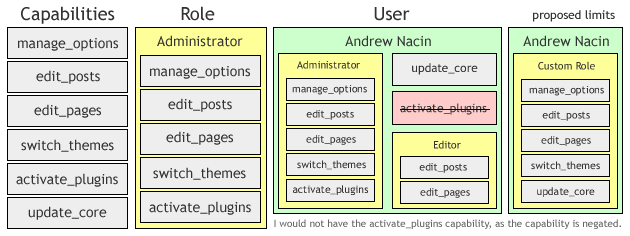
  • You can grant individual users a specific capability that their role does not otherwise give them. Example: A user with the Editor role can be given the activate_plugins capability.
  • A user can have capabilities removed from them, negating capabilities they would otherwise have through their role. Example: A user with the Editor role can be stripped of the unfiltered_html capability.

But wait, there’s more:

  • A user can have more than one role. Thus, a user could have both the Editor role, and the Administrator role. (Since all capabilities in the Editor role are also in the Administrator role, then this example would have no effect.)

This last one is not supported by the core WordPress user interface. No publicly released plugins use it (that I know of). In fact, the main use case would be for a membership plugin (which is, incidentally, the rare use case for using your own table).

The problem is, this system cannot scale well due to the overhead. But, since most of our performance woes are from features that aren’t used, the best solution is to remove those features.

A diagram of the complexities of the roles and capabilities system. Right, the proposal currently on the table.

The current consensus — see Trac ticket #10201 — would be to eliminate user-specific capabilities (both additional capabilities, and negation), and we would force users to have only one role.

It would be an admission that the current roles/capability system, in a desire to be leaps and bounds over the original 0-to-10 user levels, went a little too far.

In a later post,* I’ll talk about the schema — how we store roles and capabilities now, how we may store roles and capabilities in the future, and how we’ll bridge the two on an upgrade. Some alternatives should also be discussed, but in the context of the schema.

* While drafting this, I’ve also been replying to that wp-hackers thread, so my thoughts on most of this are already out there.