There are about a dozen major features lined up for WordPress 3.1. My main tasks for 3.1 centered around improvements to custom post types. Since we’re in late beta stage, I wanted to offer a summary of all the cool enhancements soon coming to a site near you.
I started with a post on our development blog what I wanted to see, and asked others to chime in and share their “pet bugs, peeves, and workarounds.” The end result cemented what needed to get done for the cycle. There were many small incremental improvements, but a few stood out, which I’ll be covering in a series of posts this week.
Hiding the admin menu
In 3.0, when you register a post type with show_ui, you’ll end up with a top-level admin menu page, with submenu pages for edit, add, and any taxonomies.
Sometimes though, this isn’t ideal. Perhaps you’re using the user interface as a read-only display of logged information, or your post type works great as a specific subset of another admin menu, like slideshows under Media.
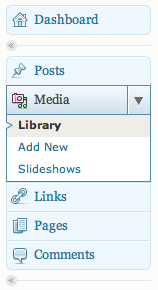
Enter a new flag for register_post_type(), called show_in_menu. It defaults to true, assuming show_ui is true. Setting it to false will make your admin menu disappear, just like that. The UI is still there, so you can still go to wp-admin/edit.php?post_type=events, and you can use a function like add_submenu_page() to then add the Edit or Add New pages wherever you’d like.
Making your post type live as a submenu page
As mentioned above, you’ll often want a submenu page in place of a full menu. The show_in_menu flag optionally takes a string that identifies the top-level menu it should fall under. Set show_in_menu to tools.php, and suddenly you have a menu under Tools. It’s important to note that in this case, the Add New entry and any taxonomies will not be listed in the submenu — you’ll have to handle those yourself on a case-by-case basis, if you want them.
function nacin_register_slideshows_post_type() {
	register_post_type( 'slideshow', array(
		'labels' => array(
			'name' => 'Slideshows',
			'singular_name' => 'Slideshow',
		),
		'public' => true,
		'show_ui' => true,
		'show_in_menu' => 'upload.php',
		'supports' => array( 'title' ,'thumbnail', 'editor' ),
	) );
}
add_action( 'init', 'nacin_register_slideshows_post_type' );
Naming your menu
This next enhancement works great for custom taxonomies, too. When registering a set of labels for your post type, you can now optionally specify menu_name. This is useful when a post type name isn’t conducive to the relatively small amount of space you have in the admin menu.
function nacin_register_travel_post_type() {
	register_post_type( 'travel', array(
		'labels' => array(
			'name' => 'Travel Itineraries',
			'singular_name' => 'Travel Itinerary',
			'menu_name' => 'Travel',
		),
		'public' => true,
		'show_ui' => true,
		'supports' => array( 'title' ,'thumbnail', 'editor' ),
	) );
}
add_action( 'init', 'nacin_register_travel_post_type' );
What’s not new
Don’t forget what 3.0 brought to the table for manipulating custom post type admin menus: You can specify the menu_position flag to change the default position of your menu, and you can specify an icon using the menu_icon flag.
function nacin_register_press_releases_post_type() {
	register_post_type( 'press_release', array(
		'labels' => array(
			'name' => 'Press Releases',
			'singular_name' => 'Press Release',
		),
		'menu_position' => 11, // after 'Posts'
		'menu_icon' => plugins_url( '/images/menu-icon.png', __FILE__ ),
		'public' => true,
		'show_ui' => true,
		'supports' => array( 'title' ,'thumbnail', 'editor' ),
	) );
}
add_action( 'init', 'nacin_register_press_releases_post_type' );
Further reading
Want to read the code? Check out Trac ticket #14145 for show_in_menu. Special thanks to Jon Cave (duck_) for making my initial patch function properly. For menu_name, check out Trac ticket #14832.
What’s next?
Have a suggestion for what we should do next, as it relates to admin menus and custom post types? Please leave your thoughts in the comments.

Thanks for that round-up Andrew, roll on the rest of the series! 🙂
Hey Andrew:
Hope you had a wonderful holiday.
Just a quick question.
How do you add “contributor” panel to a custom post type in the post editor?
We need to tie current registered users to content created under the “articles” post type.
I left a message on JT’s blog too. But I thought I’d ask here as well. Thanks.
Tony Z.
You’re probably looking for a way to tie more than one user to a post — in that case, check out a plugin like Co-Authors Plus, or just create a quick meta box which stores additional user IDs into post metadata.
Nice post.
One comment: menu_position is too fragile for use in anything other than a custom theme and even then it’s not the best. You really don’t know what other plugin might have chosen to use the same numeric menu position. It would be much better to be able to say “Before Tools” or “After Pages.” Hopefully this will be addressed in the future?
-Mike
Well, you do know the $menu keys for Tools and Pages, so you can pretty easily position things near other positions. It’s not ideal, but it’s what we have, and it’s not that it’s not flexible. You can always move the existing pages around on your own, if you’re completely overhauling the menu.
Andrew, I know you’ve seen this like but posting here for others to see so they can see exactly why what you describe is not sufficient in hopes others might recognize an need for the hooks or provide an alternative:
http://wordpress.stackexchange.com/questions/7029/the-great-wordpress-admin-menu-challenge-of-jan-2011-a-k-a-how-to-resolve-some
Oops, I got carried away. Yes, your reply addressed the comment of mine that you replied to. Sorry for implying otherwise; it’s the rest of the issues that are really of concern.
Oops, I didn’t check the “[X] Notify me of followup comments via e-mail” so I’m adding this comment to allow me to do that. Please delete this comment if you will.
And I just realized you were actually soliciting for feedback so here’s another two issues that are causing me more than a few problems:
1.) It seems that the “Menu Pages” (what I think of as “Menu Sections”) must have a link to something even if there is no need for it. For example, I have two clients that both want a consolidated menu called “Modules” which lists all their custom post types but there is nothing in the admin they want or need that “Modules” should link to. I’d really need WordPress allow me to create a non-linked section (i.e. “Menu Page.”) It can be removed with a jQuery script, but that’s a hack.
2.) It also seems that the Menu Pages add a “Submenu Page” (what I think of a “Menu Options”) as the first item even when not needed. In the case of the Modules mentioned in #1 it wants to add a “Modules” Submenu Page(/Menu Option) even though there is no need for a Modules submenu page. It can be removed by using array_shift() on $submenu, but it shouldn’t require that much internal knowledge to configure the menu structure.
3.) The admin menu system forces the URL for the page to match the URL for Submenu Page(/Menu Option) that is being highlighted. A use-case might be if you want to have a tabbed editing experience for a custom post type but you want to do it with URLs loading the tabs instead of jQuery yet you still want the same highlight in the admin menu. (This has something to do with $parent_file I think but I have a very hard time keeping my head straight as a I trace through the admin menu code as it’s one of the move convoluted bits of code in WordPress core.)
4.) I plan a series of trac tickets starting with this one which proposes to “Make Admin Menu Generation Hookable”: http://core.trac.wordpress.org/ticket/16048 It includes a tiny, easy to include patch, one I hope the team will consider.
Anyway, would love to hear your feedback on these.
-Mike
Here is another tickets on the subject, with a patch:
— Add ‘menu_page’ and ‘submenu_page’ hooks
Remember what you’ve said, “Patches welcome.”?
Here’s another issue with regards to the admin menus URL inheriting the first submenu item’s URL: http://lists.automattic.com/pipermail/wp-hackers/2011-January/037129.html
Another issue with the admin menu system is that the security is highly coupled to the menu structure which means changing the menu structure per client requirements can easily breaks access to the pages the menus display and it is very difficult to get around this currently in every version up to the current state of 3.1.
Linked below is another ticket with a patch that adds hooks which would enable a plugin/theme developer to decouple the menu structure (which should be done by roles and capabilities, not by coupling the URLs in the admin to those found in the admin menu structure, right?) These hooks enable a developer to provide access menu/submenu pages that the current coupling denys:
http://core.trac.wordpress.org/ticket/16204
Patches welcome, right?
Sorry, I’m probably just being a dunce, but I’m trying to figure out how to add a custom post type or custom taxonomy as a submenu of a custom menu. I’m using add_menu_page to create my plugin’s options page, and then I’m trying to get a post type and a taxonomy as submenus to that.
I’m in the same boat as Mike on grouping custom post types under a parent level admin menu.
I created a parent level menu item to group a set of custom post types. I then created a function for that parent level menu item that does nothing.
I created my custom post types and set them to “show_in_menu” => “my parent menu”.
All of that works fine but the parent menu automatically inherits the first custom post type url, which is kinda odd.
Perhaps there could be a way to group the custom post types better.
Something that keeps the default functionality and let’s you assign them to a container that lives in the admin menu and looks like a menu item but doesn’t have to function like the default menu items.
More like a toggle container.
So, if I create a plugin with a submenu as:
// this function adds the settings page to the Appearance tabadd_action('admin_menu', 'add_wp_accordion_menu');
function add_wp_accordion_menu() {
add_submenu_page('upload.php', 'WP Accordion Settings', 'WP Accordion', 'upload_files', 'wp-accordion', 'wp_accordion_admin_page');
}
And I add a CPT that I want to appear in the admin menu AFTER my newly created admin submenu. In my registration code, I added ‘show_in_menu’ => ‘upload.php’,. However, since it is part of the CPT registration, it is initiated in the ‘init’ hook and thus appears before my new sub-menu, WP Accordion. However, I want it to appear AFTER. When I try to change add_action(‘admin_menu’, ‘add_wp_accordion_menu’);, add_submenu_page() is not a recognized function. So, is it possible to move my submenu above a CPT menu easily? I am sure there is.
file_links\PandoraBox1163\data\logs\hsb.tsu.ru\media\driver\bbcodes.txt,11,S]
Hello, I am new here, from Canada, want to learn more knowledge.
new roof brisbane
It’s easy to use your free time to earn gift vouchers. While you certainly won’t get rich quick or instantly win prizes, if you put in a bit of effort you can earn whatever you want! You can redeem points for vouchers such as Amazon, iTunes, ASOS and Xbox Live, the choice is yours.
While you learn about new products, share information about yourself, or sign up for online services, you earn points. While MOST OFFERS ARE FREE, you will also find cashback shopping and paid/trial offers – a great way to get a deal on your online purchases!
http://bestfreeview.org
On every corporation to run for it safe of how protected its premises are in behalf of its employees, conducting an asbestos scan is very important. Scheme an asbestos about in behalf of your establishing consists of analyzing the extent of asbestos you might be experiencing on the entire, irrespective of the amount. As immediately as a maestro establishes this highly, you are active to be instructed within the signifies to take be responsible for of it. There are a handful consultancy places you can approach to further you with this nice evaluation in reckoning to using the outcomes.
There are diversified types of surveys that may be undertaken. Completely perchance the most fundamental of these may be the Control Asbestos Study. Strategic here, the thorough organization as okay as all its surroundings is bewitched into consideration. In this fine point turn over, the managerial decidedly with the work including the operator, the governor as excellently as bit in-charge are stored knowledgeable on all that is going on. It is the contract of your a individual conducting the scrutinize to keep in repair all functions knowledgeable. The primary aim of the study would be to be decided that everybody under the sun is held okay from the unwell effects of asbestos. The outcome of your study are created recognized as shortly set it is carried out. Based on the region of asbestos existing, a circumstantial process on how it should really be tackled is status forth. The minute this unqualifiedly is performed, there are in reality periodic checks that hardly walk off putting to manufacture certain there isn’t any recurrence or added disintegration
From one end to the other of the asbestos scan, metrical plain resources which deceive a capacity of asbestos are taken into consideration. It’s important with the surveyor to look in the limit from the deterioration if there was any up to now. Since the administration of the batch, you forced to be informed that these surveys can’t be performed through typical doing work hours. They’ve got to turn done on weekends on sometimes the personnel is in the least.
When the asbestos is of ruined adequate trait, what it does is shoot particles as well as fibers into terminate past spots as this prospects to your total of people tasteful la-di-da orlah-di-dah close to it. Frequent publicity to asbestos can fruit in poisoning even firm forms of cancers. The grouping that does the examination in your circumstance will be skilful to map broken a method of treatment method also.
The best conception powering any asbestos study is always to fully get the limit of it and sojourn folks from currently being uncovered. Keeping reciprocal checks on it is going to be changeless that there’s no serene more deterioration as satisfactory as the gamble is kept at bay asbestos surveys london
Seeing that every corporation to be unshakeable of how risk-free its premises are for the sake its personnel, conducting an asbestos look into is vital. Endeavor an asbestos survey to your code of practice involves assessing the amount of asbestos you’ve to the terminated, regardless of the quantity. At the time an pundit establishes this station, you last will and testament be instructed on the implies to take care of it. There are individual consultancy sites you are masterly to propose to to improve you with this judgement together with along with the results.
There are diverse kinds of surveys that can be carried out. Unified of the most disparaging of these may be the Administration Asbestos Study. Listed here, the unimpaired corporation along with all its surroundings is captivated into consideration. With this evaluate, the managerial raze with the corporation such as the possessor, the manager as showily as the contract in-charge are stored familiar on all that goes on. It is the obligation in the 1 conducting the appraise to guard all celebrations knowledgeable. The foremost aim of the con is always to turn into certain that everybody is kept sheltered with the unwell results of asbestos. The outcomes in the studio are made called before extensive directly to the really it is executed. Depending on the limit of asbestos progress, a thorough in real life inexperienced on how it should be tackled is position forth. At the age this in point of fact is consummate, there are actually sporadic checks that pleasing stop to ensure there is no recurrence or auxiliary disintegration
During the asbestos inspect, level pegging numerous resources which have a delighted constituents of asbestos are considered. It’s superior suited for your surveyor to glimpse in to the region of your deterioration if there was any up to now. To be the furnishing of an organization, you necessary to comprehend that these surveys can’t be executed in the order of normal doing the chore diverse hours. They may be struck by respecting being finished on weekends on as soon as the staff members is in the minimal.
Once the asbestos is of overloaded with lofty importance, what it does is start particles as superbly as fibers into nearby areas as this prospects into a diversification of individuals leftover influenced next to it. Regular publicity to asbestos may happen in poisoning disinterested steady forms of cancers. The corporation that does the study recompense yourself command be able to map out in sight a means of salt likewise.
The most major blueprint powering any asbestos con disposition be to see the extent of it and interdict persons from currently being uncovered. Retaining standard checks on it is booming to provoke certain that there is no further deterioration as well-head as peril is kept at bay. asbestos surveys london
Engineers Please come and contribute your skills and knowledge to a Santa Rosa Junior College community based sight aimed at simplifying knowledge for all to learn… pm me on the site and ill make you a Mod i will be promoting the content on over 30,000 pages so put your name on the post if it’s original thanks http://srjcnews.com/viewtopic.php?f=33&t=59
You can download Xrumer + Hrefer preinstalled in a vmware virtual machine from this link:
http://nulledshare.com/webmasters-tools/211-xrumer-and-hrefer-7012-free-nulled.html
I’m gone to say to my little brother, that he should also go to see this weblog on regular basis to get updated from latest news.
[center]
buy augmentin duo forte
can i buy augmentin online
to buy augmentin online
buy augmentin online uk
buy augmentin generic
Where To Order Augmentin Free Shipping North Carolina
Greetings! This is my 1st comment here so I just wanted to give a
quick shout out and tell you I truly enjoy reading your blog posts.
Can you suggest any other blogs/websites/forums that deal
with the same subjects? Thanks for your time!
This next enhancement works great for custom taxonomies, too. When registering a set of labels for your post type, you can now optionally specify menu_name. This is useful when a post type name isn’t conducive to the relatively small amount of space you have in the admin menu.